WhereQ-DOSBox 1.0.0.9: the keyboard becomes a handheld console


A compromise, wearing the shape of a keyboard
The DOS picture is 4:3. A phone in landscape is 20:9. The difference is two black bars, one on each side of the picture, and for two releases those bars were where the keys lived.
They were not bad bars. The arrows went into the inverted T of a real keyboard, the modifiers and the editing keys into the other side, and the picture kept the whole middle of the screen. It worked.
It was also the wrong shape for the thing it was standing in for. A DOS game is played with the left thumb on the arrows and the right thumb on the keys, and every one of those keys was a long way from where a thumb expects it.
What a handheld console does
A handheld console puts the screen in the middle and the controls in your hands — one hand on each side — and it never lets the controls sit on top of the picture.
That is the whole idea behind 1.0.0.9. The bars are no longer two columns of whatever fitted; they are two pads, and the picture sits untouched in the middle.
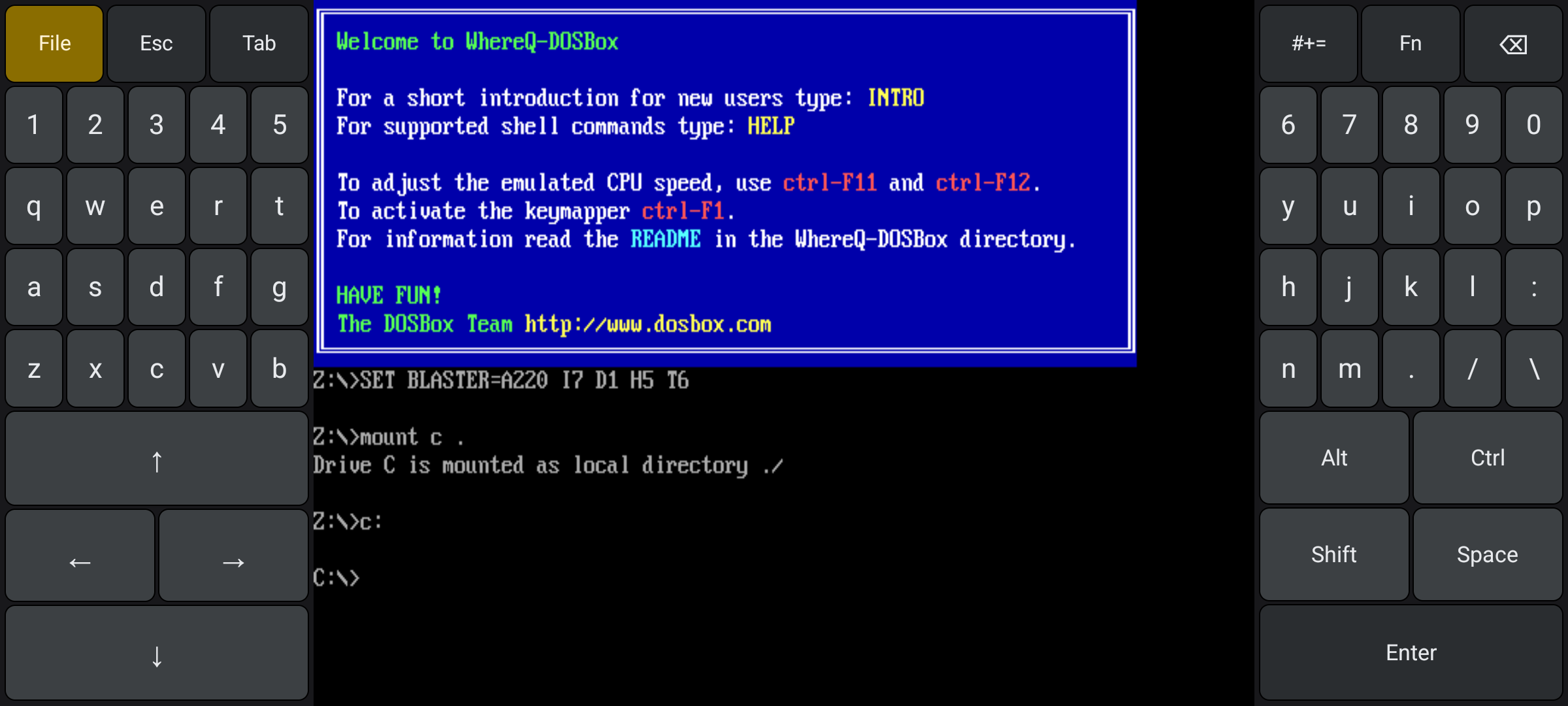
The left pad carries the arrows and the left half of the keyboard, the right pad the action keys and the right half. The picture keeps the middle, and nothing is drawn over it.
The left pad is the thumb that steers: the four arrows as a D-pad — up on top, left and right side by side, down below, so the finger reads the direction by shape alone — and above them the left half of a split QWERTY, with File, Esc and Tab along the top.
The right pad is the thumb that acts: Alt, Ctrl, Shift, Space and Enter under the right thumb, the right half of the QWERTY above them, and #+=, Fn and Backspace along the top.
The QWERTY is split rather than shrunk. 12345 qwert asdfg zxcvb on the left, 67890 yuiop hjkl: nm./\ on the right — each half is a real key size, not a miniature of the whole thing.
Three layers, one key each
A split keyboard is only half the story; the other half is what you do when you run out of keys. The answer here is one key per layer, in the top row of the right pad.
#+= swaps both halves for the punctuation. The key lights up blue while its layer is on, and turns into abc, because that is what pressing it brings you back to.
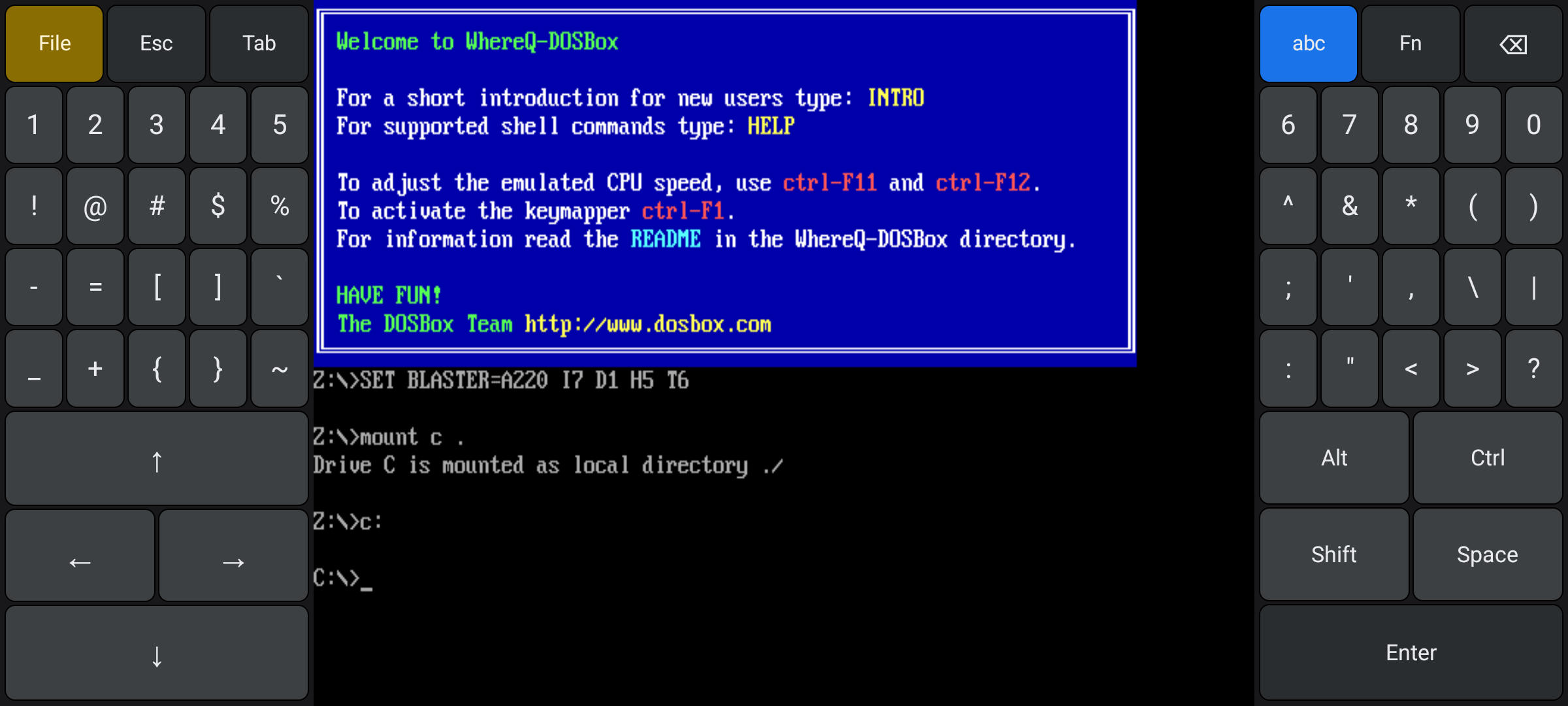
The punctuation layer. Every shifted character sits directly below its unshifted key, and the switched key is lit.
Fn brings up the functions: F1 to F12 on the left, and Ins / Del, Home / End, PgUp / PgDn, Caps, PrtSc and Pause on the right.
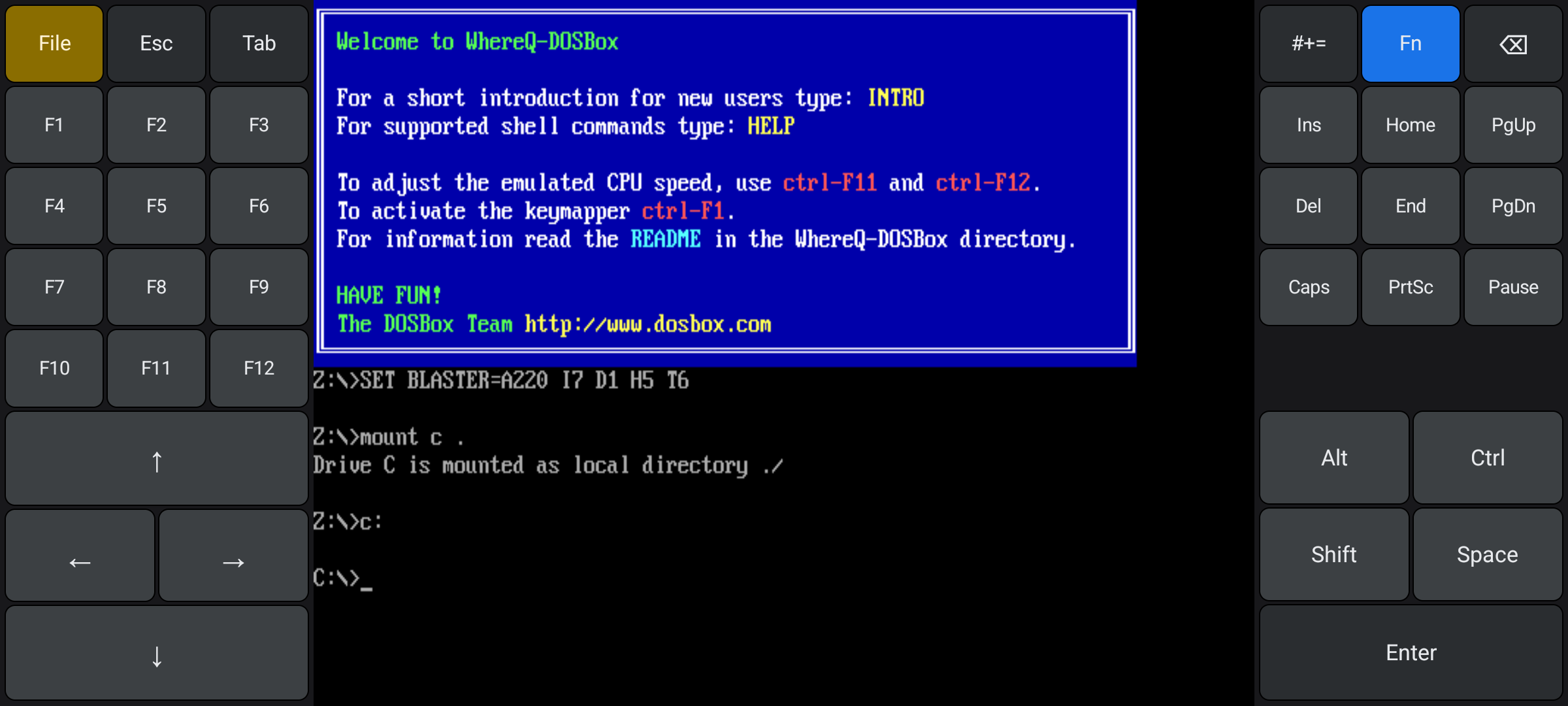
The function layer — the whole F-row and the editing keys, without stealing a single key from the letters.
And because the letter layer of the right half already carries : . / \, typing a DOS path needs no layer switch at all: C:\GAMES\DUNE\SETUP.EXE is just letters and punctuation, in that order, on one layer.
Ctrl, Alt and Shift, the way a game wants them
The modifiers were the part I had to think about longest, because two different games want two different things from Ctrl.
A tap on Ctrl, Alt or Shift arms it: the next key you press is modified, and the modifier releases itself. Ctrl, then C — that is what a text editor or a DOS shell wants.
A hold keeps it pressed for as long as your finger is down, like a real key. That is what a game wants from its fire and strafe keys: hold Ctrl on the right thumb while the left thumb walks the D-pad, and the game sees both at once.
The old keyboard could only do the first one. The new pads do both, because a modifier is just a key that is down.
The layout follows the screen
Not every phone has 20:9 of letterbox to work with, so the keyboard picks its shape from the width of the bar: the full pads when there is room for them (at least 116 dp), a single key column per side with the fold-up QWERTY when there is less, and a slim strip along the bottom in portrait.
Here is the part I am not happy about.
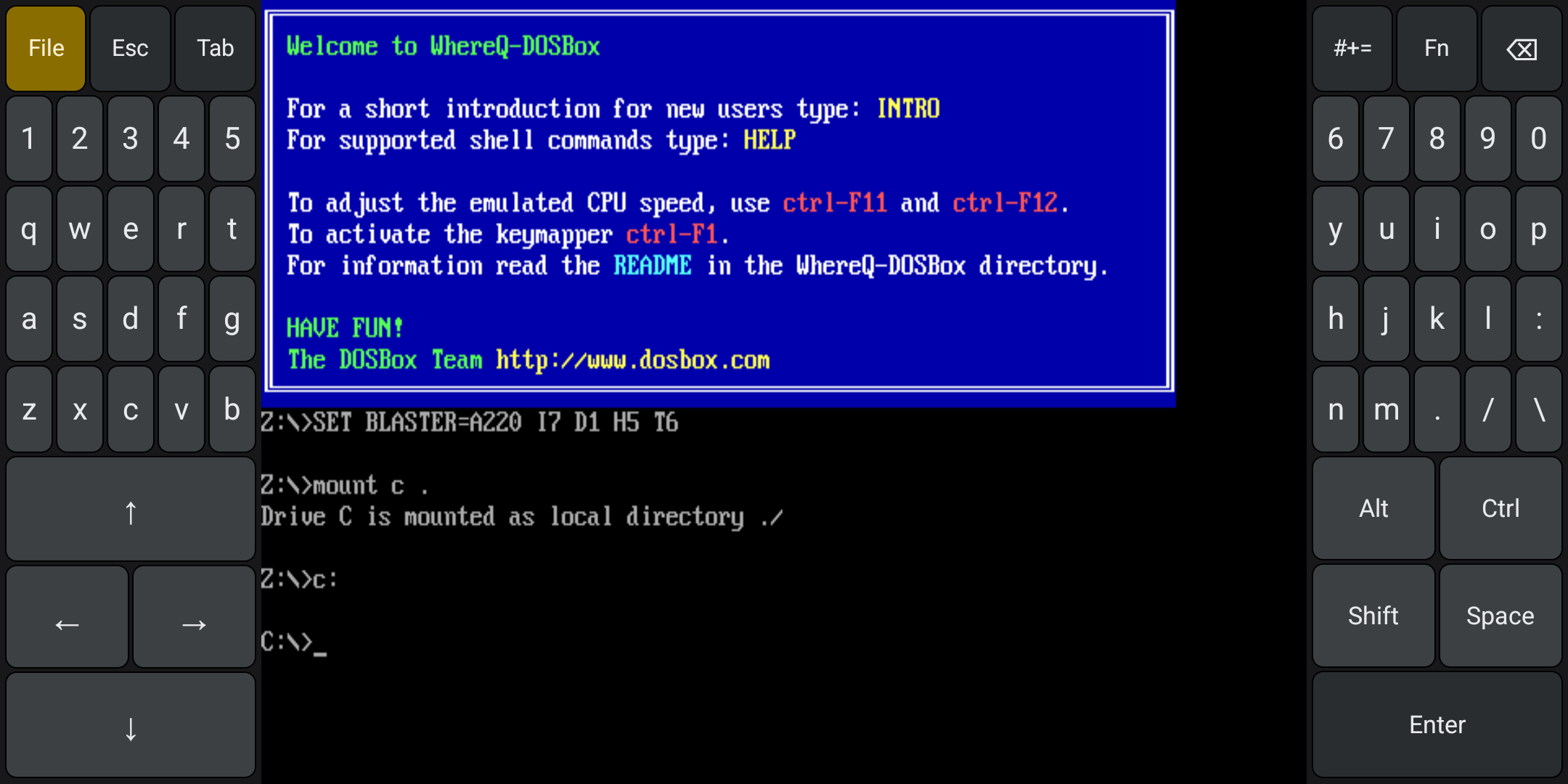
The same layout on an 18:9 screen. The pads still fit, but the letters are small — about 24 dp wide, against 33 dp on a 20:9 screen.
On a 20:9 screen the letter keys come out at 32.8 dp wide. On an 18:9 screen — the shape of a lot of phones — the bars are narrower and the same layout leaves the letters at 23.6 dp, about 2.9 % of the screen width, where a normal phone keyboard key is roughly twice that. The D-pad and the action keys keep their full size; it is the letters that get tight.
I measured it rather than guessed: both widths were run on the emulator and typed into, and the screenshots of all three layers at both widths are in the repository. What I have not done is try it on a physical 18:9 phone, and that is the gap I would want a reader with such a phone to close for me.
Nothing underneath changed
The whole release is app-layer work. The SDL surface stays full-screen, the keyboard only ever draws in the bars beside the picture, and libdosbox.so is the same library 1.0.0.8 shipped — byte for byte the same native core, recompiled with the same flags.
Sometimes the honest way to describe a big change is to say what did not change.
The pipeline builds the releases now
The repository has a CI pipeline for the first time. On every push and every pull request, ci.yml builds the emulator from source for all three ABIs — SDL2 and the whole DOSBox core, three times — and packages an app on top of them, checking that all three native libraries really made it into the APK.
On a v* tag, release.yml builds the release APK, signs it with the release key, checks the certificate against the known fingerprint, and publishes it as a GitHub Release with its SHA-256.
The key itself lives in the repository's secrets — the keystore base64-encoded, the store password and the alias beside it — and never in the tree. The pipeline refuses to publish if the certificate is not the one every previous release was signed with, because an APK signed with a different key cannot be installed over the old one, and finding that out on a user's phone is not a good place to find it.
Get it
The release APK is in the repository, signed with the release key, so it installs over 1.0.0.8 in place:
👉 github.com/whereq/whereq-dosbox — tag v1.0.0.9
downloads/whereq-dosbox-1.0.0.9.apk
sha256: cd6d0bdafd0f84c7324936c89a6cab14ed87a21e4211ed8909078b4a7a51ac02
It runs on arm64-v8a, armeabi-v7a and x86_64 devices, Android 5.0 and newer, entirely offline, with no account and no tracking. The project is GPL-2.0, and the DOSBox core is embedded with its AUTHORS, ChangeLog, COPYING and per-file headers intact.
Again, this post is not the documentation. The documentation is the repository: the build guide, the porting log — including the section that explains the three width rules and the measured key sizes — the design notes of the keyboard itself, and every line of the port. Please read those rather than take my word for it.
Thank you, DOSBox
None of this is possible without the DOSBox project.
DOSBox was written by the DOSBox Team — a volunteer crew who took an operating system from 1994 and made it runnable on every machine the world has produced since, including the ones that did not exist yet. They kept it alive for three decades and gave it away to anyone who wanted it. WhereQ-DOSBox is a thin layer on top of their work. The originality, the craft and the generosity are entirely theirs.
This port is built on Em-DOSBox, the Emscripten build of DOSBox r4305 by Boris Gjenero, which grew out of Ismail Khatib's first attempt to compile DOSBox with Emscripten, and rode on the Emscripten work of Alon Zakai. The SDL2 library by Sam Lantinga carries the window, the audio and the touch input.
DOSBox is a trademark of the DOSBox project; this port is not affiliated with or endorsed by the DOSBox team.
If you have a phone with a narrow screen and the letters feel too small — tell me. That is the one thing in this release I would like to have seen on real hardware before shipping it, and I would rather hear it from you than find it out myself.