WhereQ-DOSBox: bringing the DOS era back to your phone


The machine in the corner of the room
I remember the fan first.
Not the games, not the arguments with the diskette drive — the fan. A beige tower in the corner of my parents' living room, its fan whirring like it was thinking about something, and a green-ish CRT screen that was somehow a window. When that machine was on, the whole room changed temperature. It was the loudest thing in the house, and it was mine.
Then came the blinking cursor.
C:\>
That prompt was an invitation. It didn't explain itself; it waited. And if you were willing to learn its language — cd, dir, copy, mkdir — it would do exactly what you asked. I didn't know it yet, but that was the first time a computer felt like a tool rather than a appliance you consumed.
Games, and the software underneath them
I played the usual suspects. Wolfenstein 3D on a share so smeared the floppy disk never worked. Commander Keen, bouncing around a city that was obviously made by two people with a lot of coffee. Liero at 2 AM with a friend on a dial-up line. Prince of Persia, which taught me to save often because I was going to die a lot. Duke Nukem and the original Doom, and the specific magic of a shareware episode that ended exactly where the next one would begin.
But the thing that actually changed my life wasn't the games. It was the software around the games — and the fact that it was all just files on a disk.
I wrote my first .BAT file. I typed a command so long I broke the line and had to learn about line continuation. I opened a text editor, changed a line in a configuration file, and something behaved differently. I got a Blue Screen of Death and learned that a computer could fail, that failure had causes, and that I could go looking for them.
And then — the moment that turned into a career — I realized that a program was not magic. It was text. You could open it, read it, change it, break it, and build it back. Turbo Pascal, BASIC, the autoexec.bat, the config.sys: it all looked like the same thing wearing different costumes. A person had sat down and written instructions, and the machine obeyed.
That was the 启蒙 — the ignition. Software stopped being a black box and became a thing you could touch. Everything I have built since — the distributed systems, the Kubernetes clusters, the AI agents, this website — grew out of that one realization: a machine is not a magic box, it is a machine you can read.
Then the world moved into our pockets
And then the world got a screen of its own.
Look at what a phone became. It is a camera, a wallet, a library, a newspaper, a game console, a map, a telephone, a bank, a hospital, a classroom. For most people alive today, the phone is the computer. It is where they read, work, play, learn, and think. It is where the entire center of gravity of computing moved.
And that means something quietly sad happened: the era where millions of people learned to command a machine is over. The DOS era wasn't just old — it was a way of learning that no longer has a doorway. That generation's first real contact with a computer was a blinking cursor asking what you wanted to do. Ours is a feed.
I don't think that's strictly worse. I'm not here to argue that a phone is a bad computer. But I do think it costs us something. An entire generation's sense of ownership over machines came from having to learn a command line. Nobody hands you a cursor anymore; you get a wall of rectangles and you never have to find out what's underneath.
So the question I kept asking myself was embarrassingly simple:
Why not bring DOS to the phone?
Not as a museum exhibit. Not as a nostalgia app that runs one demo in a webview. As a real thing — the genuine article, running on the actual machine in your pocket, with your own DOS games and software, the way it was meant to be used.
WhereQ-DOSBox
This is the answer, and today I'm putting it in the open.
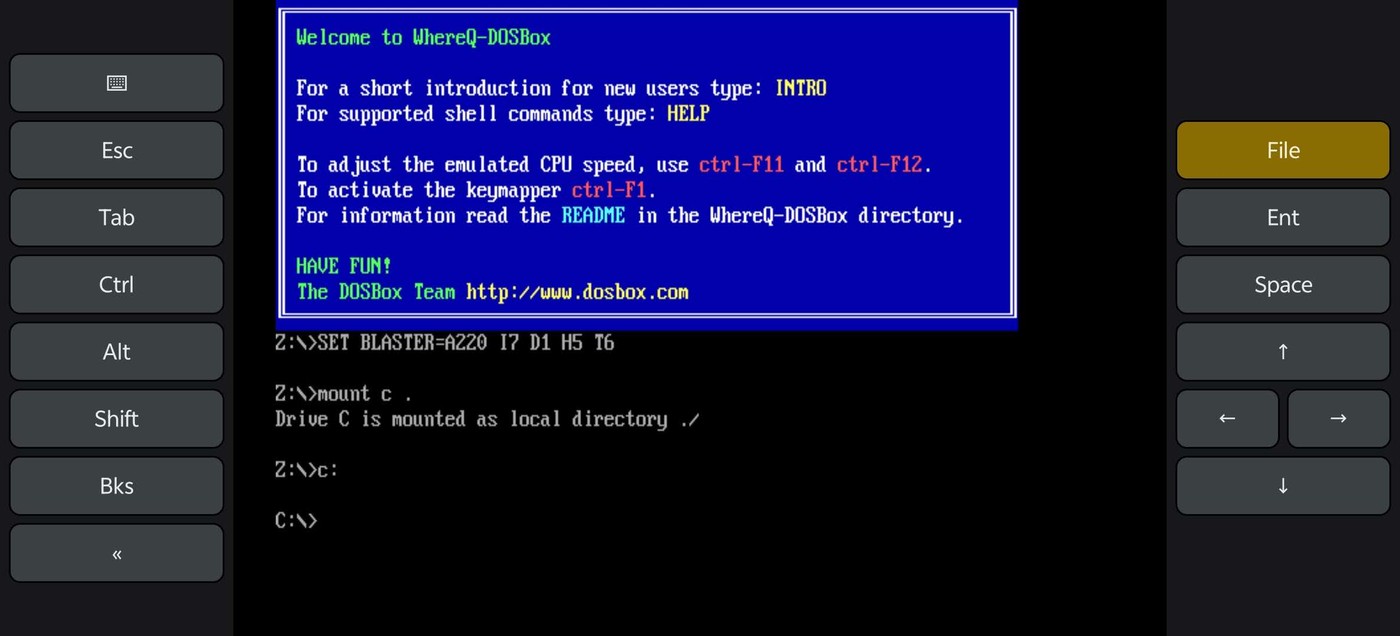
The welcome screen, a mounted drive, and the on-screen keyboard. Touch moves the DOS mouse; the keys type straight into DOSBox.
WhereQ-DOSBox is a native Android port of DOSBox — the emulator core runs as a real native library (libdosbox.so) inside an APK. Not a web page, not a WebView, not a JavaScript emulation of an x86 emulation. On your phone, at native speed.
A few things you can do with it today:
- Run your own DOS software and games, from a mounted drive on your phone.
- Type with the on-screen keyboard — the keys go straight into DOSBox.
- Use the touchscreen as the DOS mouse.
- Do all of it offline, with no account, no browser, and no tracking.
The APK is about 5.3 MB and runs on arm64-v8a, armeabi-v7a and x86_64 devices (Android 5.0 and newer).
It's open source — read it
This is a GPL-2.0 project, and the DOSBox core is embedded with its AUTHORS, ChangeLog, COPYING and per-file headers intact, exactly as the license requires. The port touches the core in only four small, local places; everything else is upstream code.
I want to be honest about something: this post is not the documentation. The documentation is the repository — the build guide, the porting log, the benchmark notes, and every line of the port are in the open, and I'd rather you read those than take my word for it.
👉 github.com/whereq/whereq-dosbox
To build it yourself:
git clone git@github.com:whereq/whereq-dosbox.git
cd whereq-dosbox
bin/build.sh all      # bootstrap + native + android + apk
That drops whereq-dosbox-debug.apk into build/apk/. The full guide — release signing, the Gradle path, the launcher icons — is in BUILDING.md.
Why I'm putting it out there
Because I keep meeting people who remember the DOS era, and who want it back — but who had quietly accepted that it was gone, filed away with the beige tower and the 3.5-inch floppies.
It isn't gone. It's just been waiting for a port.
If this brings back one evening of C:\>, one afternoon of Commander Keen, one "oh — that's how it works" moment for somebody who never had a beige tower in the corner — then the months of porting were worth it.
If it brings back a memory for you too, I'd genuinely love to hear about it.
Thank you, DOSBox
None of this is possible without the DOSBox project.
DOSBox was written by the DOSBox Team — a volunteer crew who took an operating system from 1994 and made it runnable on every machine the world has produced since, including the ones that did not exist yet. They made it compatible with a wide variety of DOS games, they kept it alive for three decades, and they did it as a gift to anyone who wanted it. WhereQ-DOSBox is a thin layer on top of their work. The originality, the craft, and the generosity are entirely theirs.
This port is built on Em-DOSBox, the Emscripten build of DOSBox r4305 by Boris Gjenero, which itself grew from Ismail Khatib's first attempt to compile DOSBox with Emscripten, and rode on the Emscripten work of Alon Zakai. Every one of them pushed the "DOS in a browser" idea further than anyone thought possible — and that idea is exactly what made "DOS on a phone" something worth trying.
Thank you. All of it. DOSBox is a trademark of the DOSBox project; this port is not affiliated with or endorsed by the DOSBox team.
If you remember a specific game, or a specific machine, or a specific C:\> prompt — tell me. I am collecting them, and this is going to be a good archive.