WhereQ-DOSBox 1.0.0.18: the keyboard you already own


The keyboard in the drawer
Somewhere in most houses there is a Bluetooth keyboard. It came with a tablet, or a phone, or a television, and it has been sitting in a drawer ever since — a rectangle of plastic with a hundred and four keys that feel better than anything a screen can pretend to be.
Pair it with the phone and it works. For everything.
Except the emulator.
That was the state of WhereQ-DOSBox until this release: you paired the keyboard, you pressed a key, and nothing happened. Not "the wrong key" — nothing. The vendored SDL2 has no path for Android key events at all; the Java layer fed only the IME, and the native side never saw a single key event come in. The on-screen keyboard was the only input the app had, and a game that wanted a keypress got a finger instead.
1.0.0.18 fixes that, and it fixes it the way the app does everything else: by refusing to invent a new input path.
An Android key code is now mapped to a DOSBox key name, and that name is resolved through the same native table the on-screen keyboard already used. Both roads end in the same scancode, in the same BIOS buffer, behind the same INT 09h. Shift, Ctrl and Alt are carried along, so DOS sees the capital letters it should. Only the first press of a held key is forwarded — DOSBox does its own auto-repeat in the BIOS timer, and every extra event would be one more scancode in the buffer. And a keystroke aimed at the launch-script editor never reaches the game, which is the one thing that had to stay true.
Checked in the emulator with real key events, not with a mock: the letters and Enter pass the copy protection of Mortal Kombat, F1 starts the game, F10 opens its own options menu, and the arrow keys move the menu cursor and are accepted as the game's movement keys.
The keyboard in the drawer is a DOS keyboard now.
A tone that was never in the music
There was a note that the emulator added to some games. Not in the music — on top of it: a steady beat, a warble that rode along under the soundtrack and vanished the moment you turned the music off.
It was the most annoying kind of bug, because it was partly true. The tone was really there. It was also really not supposed to be there, and no amount of listening could separate the two.
The cause is a piece of arithmetic in the mixer, and it took a diagram to explain. DOSBox keeps its audio buffer centred by continuously re-tuning the emulator's effective output sample rate: the producer thread runs on the emulated PIT's clock, the consumer thread runs on the phone's audio clock, and the two never agree exactly, so on every callback the mixer nudges the rate to keep the buffer near its set point. That is a fine design on a desktop.
Under the steady, heavy load of OPL/FM synthesis on a phone, though, the loop hunts. And a held FM note is a sustained carrier — exactly the kind of signal that turns a wandering sample rate into an audible beat. The digital sound effects, being transient, never revealed it: they were too short to sit on a warble.
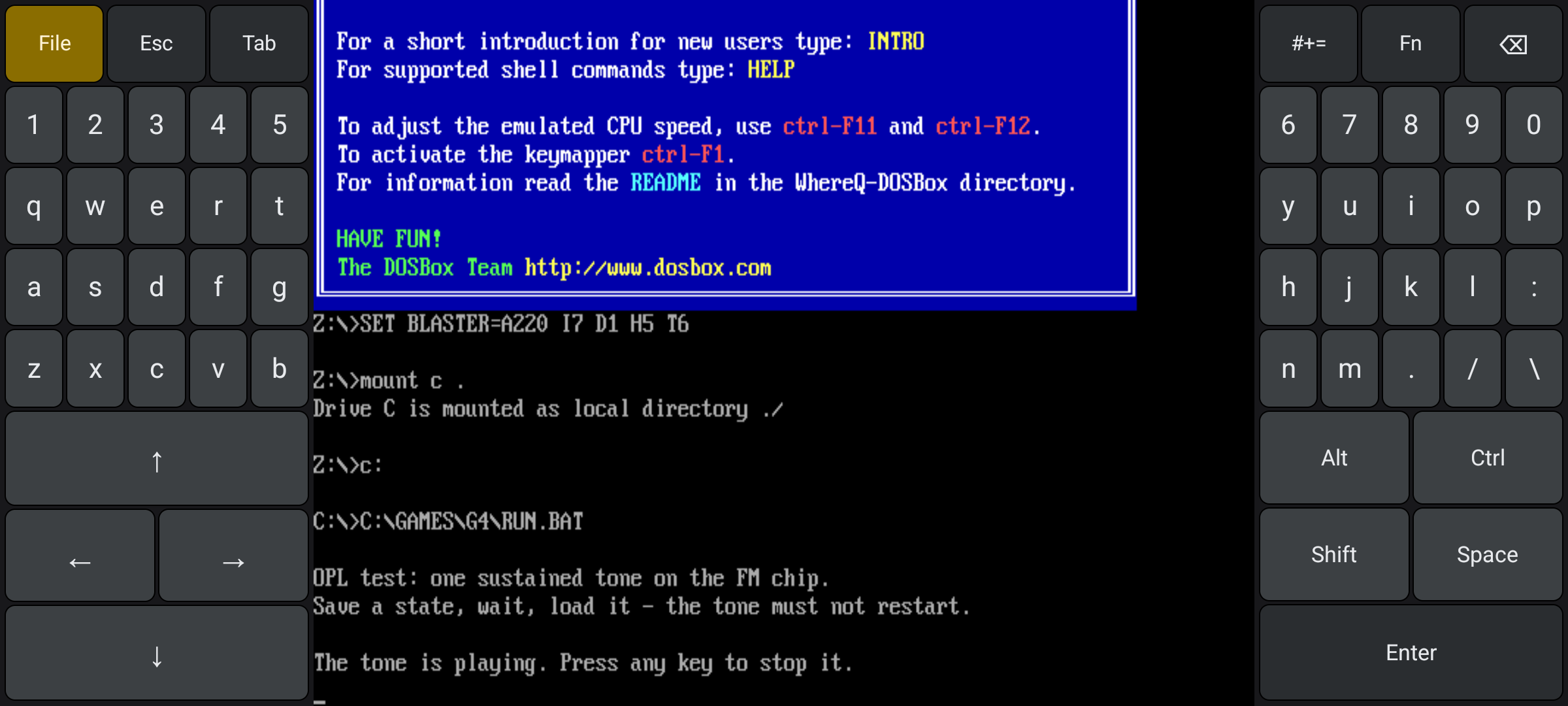
The test that exposed it: one sustained tone on the FM chip — the carrier that a wandering sample rate turns into a beat.
The fix is three lines in the dosbox.conf the app ships: the mixer runs at 48 kHz, the phone's native rate, in blocks of 2048, with a 50 ms prebuffer. The loop stops hunting, and the warble goes with it.
This changes audio buffering and nothing else. Game speed and logic are untouched, and the price is about 50 ms of latency, which is inaudible in a DOS game. The whole analysis — the pipeline, the control loop, the modulation — is in docs/AUDIO-FM-BEEP.md, with three diagrams, because the interesting part of this bug was never the three lines.
The second start
Leaving the app with the Back button and opening it again used to be enough to kill the emulator.
DOS:Too many devices added
The device table is a static array of ten slots, and the devices of a run were never removed from it. The app keeps its process alive between two starts, so the second start found the table still full, ran out of slots and died. The devices of the DOS section are now removed when it shuts down; the MSCDEX device removes itself with it.
Game Mode comes back the way you left it
Two smaller fixes in the same corner of the app.
The gamepad restores your per-game state — the profile, the D-pad mode, the remaps — in one pass now, before the gamepad is built. The order mattered: the D-pad has to be in place before the bar is built, or the chip that names the mode names the previous one, and the separate setters had to be called in an order the caller could get wrong. One layout pass cannot get it wrong.
And the TURBO auto-fire cannot get stuck any more. While the FIRE button is held, TURBO fires it again and again. That loop lived in the button's own touch listener, and a rebuild — a rotation, or the other thumb cycling a chip — detached the view mid-hold without an ACTION_UP. The listener never stopped, and the key fired forever. The loop now lives with the gamepad, and every path that releases the keys cancels it.
The guide grew to match
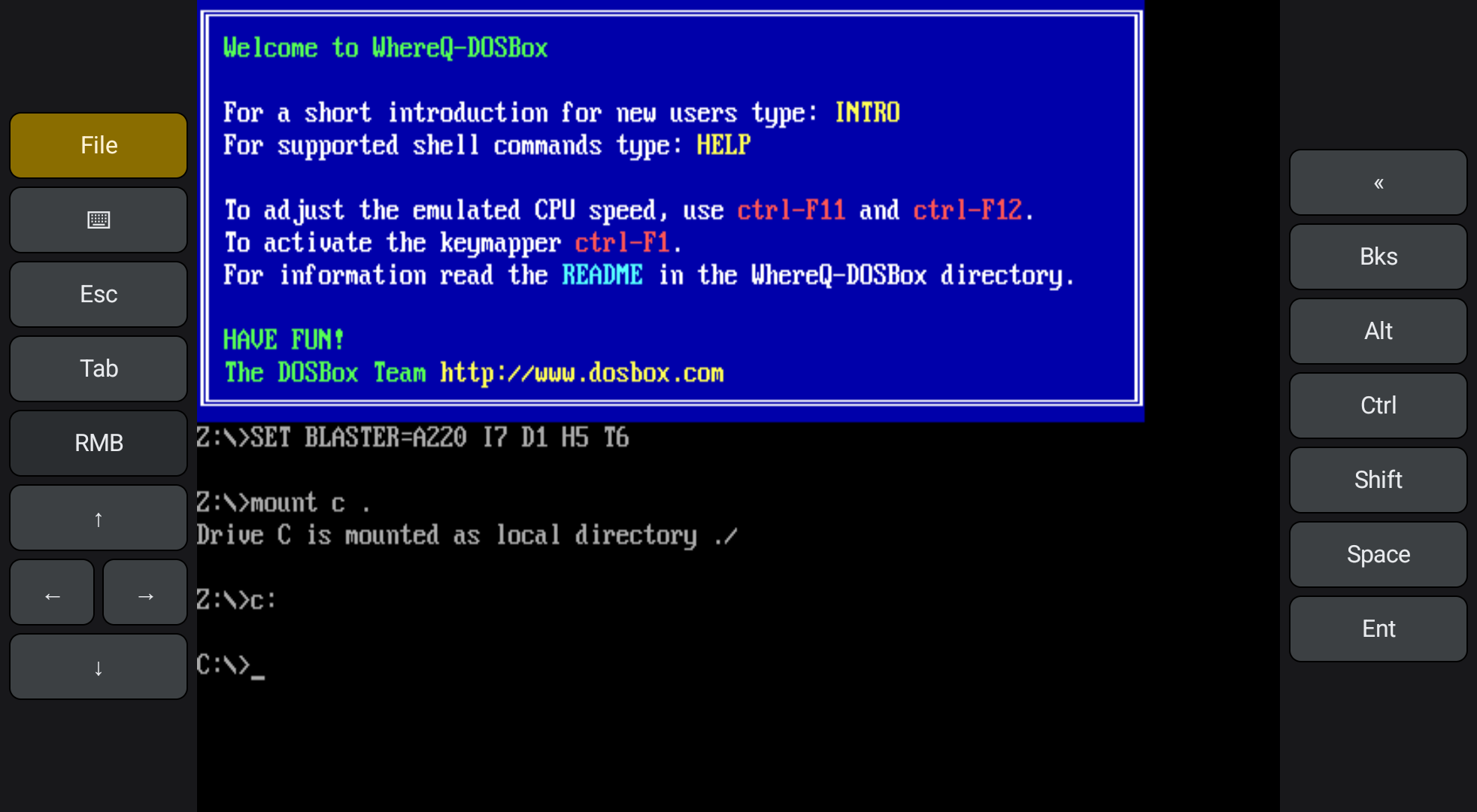
The columns layout: one key column per side, for the screen where the pads no longer fit.
The user guide had described the keyboard's three layouts and pictured two of them. The third — the columns layout, one key column per side, that the app falls back to when the black bar beside the 4:3 picture drops below 116 dp — is now a real capture, as is the narrow landscape screen where the letters are squeezed to about 24 dp. The new Game Mode screenshots were re-taken from the 1.0.0.17 release build, so the frames in the guide, in the repository and in the capture set are the same ones. The dead SEE ALSO section is out of the DOSBox man page, the remap outline is checked on the device in pixels, and the checksum of the shipped 1.0.0.17 APK is recorded in the repository.
Your save states still load
The save-state format did not change. Every save state written by the earlier releases loads normally.
Nothing in this release touches the emulator's internals — it is an app-layer release, like the ones before it — but this is the sentence that has to be in every release note, so here it is again.
Get it
The release is on the releases page as tag v1.0.0.18. The APK is published as a release asset built by CI from that tag, with a .sha256 sidecar next to it, so you can check what you downloaded.
👉 github.com/whereq/whereq-dosbox — the source, and the whole history of it.
It runs on arm64-v8a, armeabi-v7a and x86_64 devices, Android 5.0 and newer, entirely offline, with no account and no tracking. The project is GPL-2.0, and the DOSBox core is embedded with its AUTHORS, ChangeLog, COPYING and per-file headers intact.
If you are new here, the announcement says what the project is, and the user guide walks through every screen of it. The console that the keyboard became is about the pads Game Mode replaces, the save that outlives the app about the slots that still load, and the gamepad for your thumb about the second face of the keyboard. For the whole picture of the project, read WhereQ-DOSBox; for what a key does inside the machine, the interrupt map has it.
Again, this post is not the documentation. The documentation is the repository: the user guide, the technical reference, and the audio analysis. Please read those rather than take my word for it.
Thank you, DOSBox
None of this is possible without the DOSBox project.
DOSBox was written by the DOSBox Team — a volunteer crew who took an operating system from 1994 and made it runnable on every machine the world has produced since, including the ones that did not exist yet. They kept it alive for three decades and gave it away to anyone who wanted it. WhereQ-DOSBox is a thin layer on top of their work, and this release is a thin layer on top of that. The originality, the craft and the generosity are entirely theirs.
This port is built on Em-DOSBox, the Emscripten build of DOSBox r4305 by Boris Gjenero, which grew out of Ismail Khatib's first attempt to compile DOSBox with Emscripten, and rode on the Emscripten work of Alon Zakai. The SDL2 library by Sam Lantinga carries the window, the audio and the touch input — and now the hardware keyboard too.
DOSBox is a trademark of the DOSBox project; this port is not affiliated with or endorsed by the DOSBox team.
A keyboard you already own is the best input device a 1994 game ever asked for. It just needed someone to plug it in.