WhereQ-DOSBox 1.0.0.10: the sound survives the save state


The music that stayed behind
You freeze a game in the middle of a fight. The music is loud, the boss is doing something unpleasant, and you put the phone down to answer a message.
You come back two minutes later and load the state.
The fight is exactly where you left it — the sprites, the health bar, the position of the boss, all of it. The music, though, is somewhere else entirely: it was never frozen with the rest of the machine, so it carried on playing while everything else went back. And the beeping that was coming out of the PC speaker is still going on in the background, droning at nobody.
That was 1.0.0.9. The snapshot was very good, and it was missing the sound.
A save state is a machine, not a screen
A save state is supposed to be the whole machine: the CPU, the memory, the video memory, the open DOS file handles, the hardware timers. If one part of the machine is missing from the snapshot, the machine you come back to is a slightly different machine, and you can hear it.
The FM chip was not in the snapshot. Not badly, not approximately — not at all.
That is worse than it sounds, because the chip does not stop while the game is frozen. Load a state while the game is running and the emulator rewinds everything it knows about: the sprites, the health bar, the boss's coordinates, the DOS file handles, the timers. The chip is not among the things it knows, so it keeps playing. You are looking at a fight that has been rewound, and listening to music that has not.
And if the state is restored into a fresh process — which is what the Resume button does after the app has been closed — the chip is new, blank and silent, and the music is simply gone.
The PC speaker was a third kind of broken. It was in the snapshot, but it is a real-time output device, and its queued delays and its timer indices were restored against the current clock rather than the saved one — so the mixer carried on emitting a beep the guest had never asked for. It came back droning.
What "exactly" means here
The fix is to snapshot the chip itself — the whole thing, not a summary of it. The OPL's state is a single struct of about five kilobytes: the envelope of every operator, the wave phase, the LFO counters, the feedback history. It is written into the state file and read back, so the next sample continues from where the last one stopped.
There is a cheaper version of this, and it is worth explaining why it is not enough. The port keeps a copy of the chip's 512 registers — the ones the driver wrote its instruments into — and a restore can replay them. That rebuilds the instruments perfectly. But a driver programs its instruments once at the start of a song and then only says key on and key off; everything that happens in between lives inside the chip, where no register records it. Replaying the registers therefore re-triggers every note from its attack. The tone comes back — but it comes back wrong: it starts again instead of continuing where it was.
So the register replay is still here, as the fallback for the OPL models that cannot snapshot themselves. But it is a fallback now, not the plan.
How I checked it
The way I convinced myself this works is the way I would want to be convinced: I wrote a test program that programs one sustained tone on the FM chip and then waits for a key.
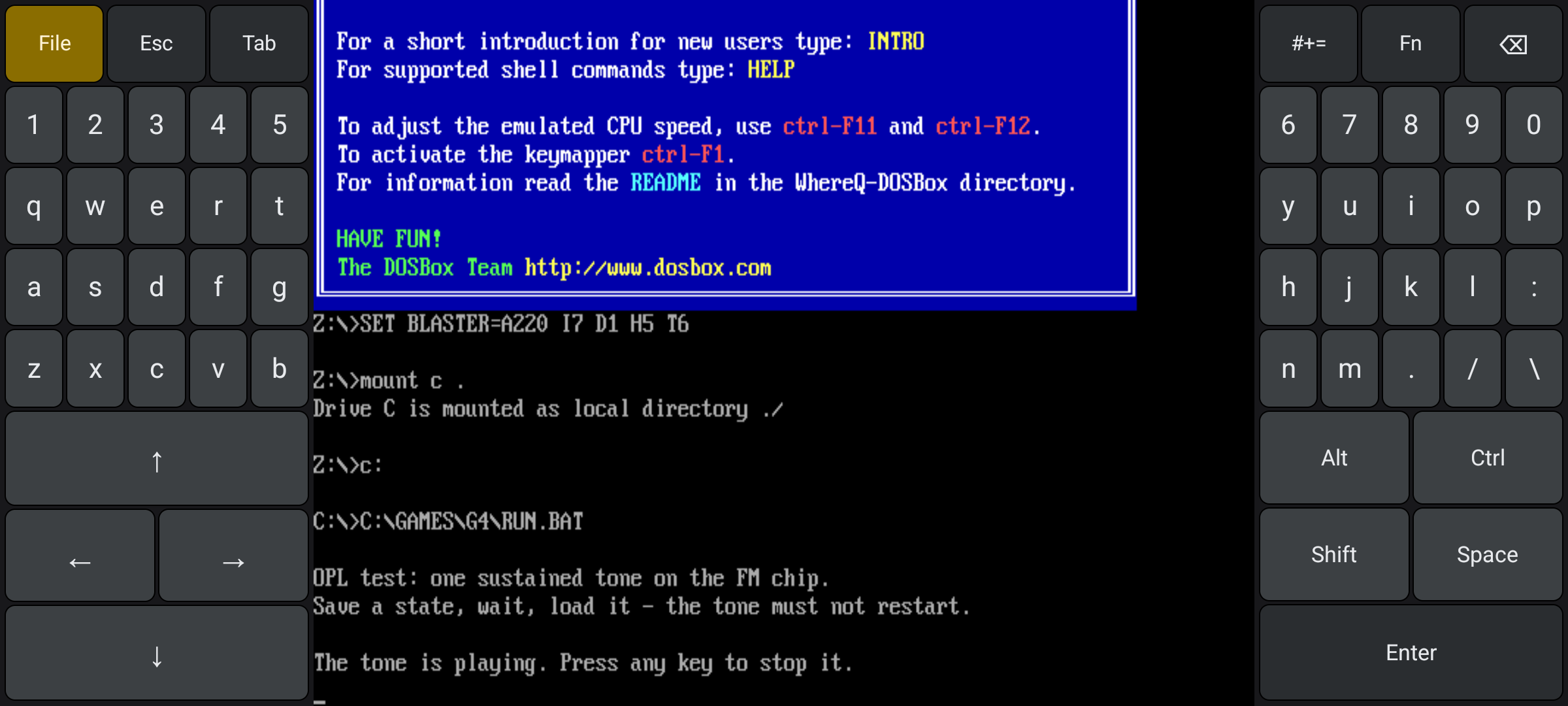
The OPL test bundle: one sustained tone, and an instruction to save a state, wait, and load it again.
The bundle is in the repository, so you can run it yourself. It says what it is on the screen: "The tone is playing. Press any key to stop it."
Then the port writes the chip's state to the log when it saves, and writes it again when it loads, and the two have to match — same envelope, same wave phase, same LFO counter, same register contents.
Here they are, two minutes of live chip time apart:
savestate: OPL chip saved:    ... phase=d96f49ac ... active=36 lfo=000b228c opl3=0
savestate: OPL module saved:  exact=1 mode=2 regs=62/512 r20=31 r23=31 r40=3f ...

savestate: OPL chip restored: ... phase=d96f49ac ... active=36 lfo=000b228c opl3=0
savestate: OPL module restored: exact=1 mode=2 regs=62/512 r20=31 r23=31 r40=3f ...
Identical. The tone picked up in the middle of its attack and carried on.
One consequence you should know about
Save states written by 1.0.0.9 cannot be loaded by 1.0.0.10.
The state file grew a version when the sound chips became part of the snapshot, and the loader now refuses an older state rather than misreading it. That is the honest behaviour — a state that loads but plays the wrong sound is worse than a state that says no.
If you have save states from 1.0.0.9 that you care about, load them before you update.
A key that stayed down
Rotating the phone while a key was held left that key pressed in DOSBox for ever. The layout is rebuilt on a rotation, and the rebuilt layout did not tell the emulator that the finger had come up — so the key stayed down, and DOSBox went on repeating it.
Now every key that is down is released when the layout is rebuilt.
There was a second half to it. Ctrl is shown in two places at once — on the pad and on the fold-up panel — and the code assumed there was only ever one finger on it, so releasing it in one place cancelled it in the other. It now counts the fingers.
The launcher that fits
The Files panel measures the space it has and caps the game list to it. A third game used to push the buttons off the bottom edge of the panel, where nothing could bring them back.
This is the smallest change in the release and the one I am most annoyed did not happen in the first three.
The desktop build links again
The save-state code was never added to the autotools build, so the desktop baseline — the build that keeps the emulator core honest, the one that compiles on a laptop in seconds — had stopped linking. It had been broken since the save states went in, in 1.0.0.8, and I did not notice for two releases because I was busy shipping the Android one.
There were four separate reasons, and they are all of the same kind: a source file missing from the build, a missing include, a function that should have been compiled out, and the same archive listed twice in a row, which is a circular dependency that only shows up in a particular order.
The baseline compiles and links again, and it runs.
One document instead of a diary
The repository used to carry a porting/ folder: a porting log, some bench notes, a design note for the keyboard, and a log file. It was useful while the port was being written and it had stopped being useful the moment it was finished, because it was a chronicle — you had to know the order of things to know what was true now.
There is now one reference document: docs/TECHNICAL-REFERENCE.md. It is the whole implementation in one place — the native build and the ABI matrix, the save-state machine and its file format, the exact FM snapshot, the DOS layer inside the snapshot, the bundle launcher, the on-screen keyboard, the throughput benchmark, what is still not captured, and every screenshot the port produced, with the source references inline.
The diary did not disappear; it became chapters. The history is still in the git log, where history belongs.
The Android migration is over
This release carries a tag that is not a release:
milestone/android-migration-complete
It is annotated, it pointed at this release's commit — the marker has since moved on to v1.0.0.13 — and it deliberately sits outside the vX.Y.Z.A scheme the release script understands, so the script will never pick it up and try to release it again.
It marks a phase, not a version. The Android migration is done: the emulator core builds for three ABIs, the app layer works on a real device, save states carry the whole machine including the sound, and the desktop baseline links. What comes after this is maintenance — bug fixes and documentation polish. No new features are planned.
Get it
The release APK is in the repository, signed with the release key, so it installs over 1.0.0.9 in place:
👉 github.com/whereq/whereq-dosbox — tag v1.0.0.10
downloads/whereq-dosbox-1.0.0.10.apk
sha256: 80bdce1b4bdeba809159310441e450e704f6c322e2a3ff98bcc822ed50077018
The GitHub Release carries its own asset, built by the pipeline on a clean runner, with its own SHA-256 file next to it.
It runs on arm64-v8a, armeabi-v7a and x86_64 devices, Android 5.0 and newer, entirely offline, with no account and no tracking. The project is GPL-2.0, and the DOSBox core is embedded with its AUTHORS, ChangeLog, COPYING and per-file headers intact.
Again, this post is not the documentation. The documentation is the repository, and it is now a single reference document rather than a folder of notes. Please read that rather than take my word for it.
Thank you, DOSBox
None of this is possible without the DOSBox project.
DOSBox was written by the DOSBox Team — a volunteer crew who took an operating system from 1994 and made it runnable on every machine the world has produced since, including the ones that did not exist yet. They kept it alive for three decades and gave it away to anyone who wanted it. WhereQ-DOSBox is a thin layer on top of their work. The originality, the craft and the generosity are entirely theirs.
This port is built on Em-DOSBox, the Emscripten build of DOSBox r4305 by Boris Gjenero, which grew out of Ismail Khatib's first attempt to compile DOSBox with Emscripten, and rode on the Emscripten work of Alon Zakai. The SDL2 library by Sam Lantinga carries the window, the audio and the touch input.
DOSBox is a trademark of the DOSBox project; this port is not affiliated with or endorsed by the DOSBox team.
A save state that cannot hear is only half a save state. That is what made me write a test program for a sound chip. If your states came back with the music out of sync — or gone entirely — this is the release you want.