WhereQ-DOSBox 1.0.0.7: your own DOS games, a real JIT, and a launcher that fits on a phone

The emulator was the easy part
Yesterday I put WhereQ-DOSBox out into the world: a native Android port of DOSBox, the emulator core running as a real libdosbox.so inside an APK.
The announcement made a promise: your own DOS games, on the actual machine in your pocket.
A promise like that is cheap to make with an emulator that boots to a C:\> prompt. It gets expensive the moment someone tries to actually use it — because then the emulator is the smallest part of the problem.
So here is what six releases, v1.0.0.2 through v1.0.0.7, actually fixed.
First: how do you get your games onto the phone?
This was the wall. DOSBox boots, and then you are staring at a drive with nothing on it. Your games live in a .zip from somewhere in 1997, and the file manager on your phone is not going to unpack a DOS directory tree for you.
So the app grew a launcher. A .zip is a bundle: any DOS program, unpacked once into C:\GAMES\<n> on the mounted C: drive, with a RUN.BAT that starts it. Three ways to get one in, none of which asks for a permission:
- the system file picker, for a single
.zip; - the system folder picker, which unpacks every
.zipin a folder at once; - and Open with WhereQ-DOSBox, so a bundle you tap in a file manager installs itself.
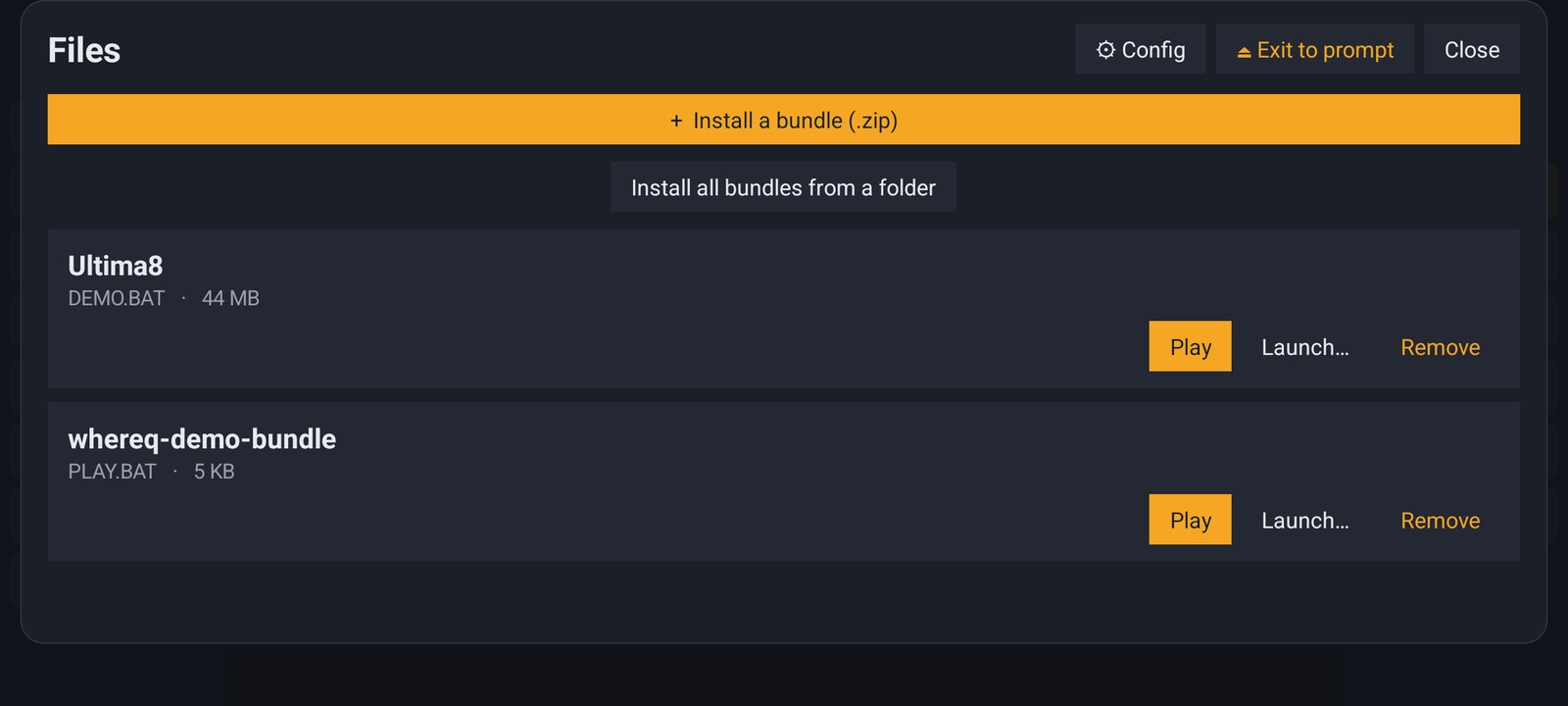
The Files panel. Two bundles, one tap to play, and an escape hatch (Exit to prompt) that always works — even when the game has hung or gone black.
One detail that took more care than it looks: DOSBox caches the directory listing of a drive when it mounts it. A bundle installed afterwards is not in that cache, so an installer that enumerates its own files finds nothing. The launcher therefore restarts the emulator into a clean boot with a freshly mounted C: for every game it starts. It costs a second, and it is the difference between "installed" and "actually runs".
Then: the button was called the wrong thing
The launcher arrived as a Games button, because that is what I assumed people would want. It was wrong: the launcher does not open games. It opens bundles, and a bundle can hold any DOS program — a utility, a text-mode application, a demo, a shareware episode you always wanted to finish.
So the button is File now — the old DOS way — and the panel is Files. Install a bundle (.zip), No bundles installed yet, Start file…. Small thing. It is the kind of small thing that turns a demo into a tool.
And: the keyboard did not fit on the screen
The on-screen keyboard had 21 keys of a fixed width. In landscape, that is wider than the phone — the last key was cut off and could not be pressed. The keys are weighed now, so the strip always fills the width exactly.
Then the strip itself became the problem: it ate a third of the screen. The DOS picture is 4:3 and letterboxed, so in landscape there are black bars down the left and right — and the always-on keys now live in those bars as two vertical columns. The modifiers on the left, File, Ent, Space and the arrow keys on the right, and the whole middle of the screen stays a DOS screen.
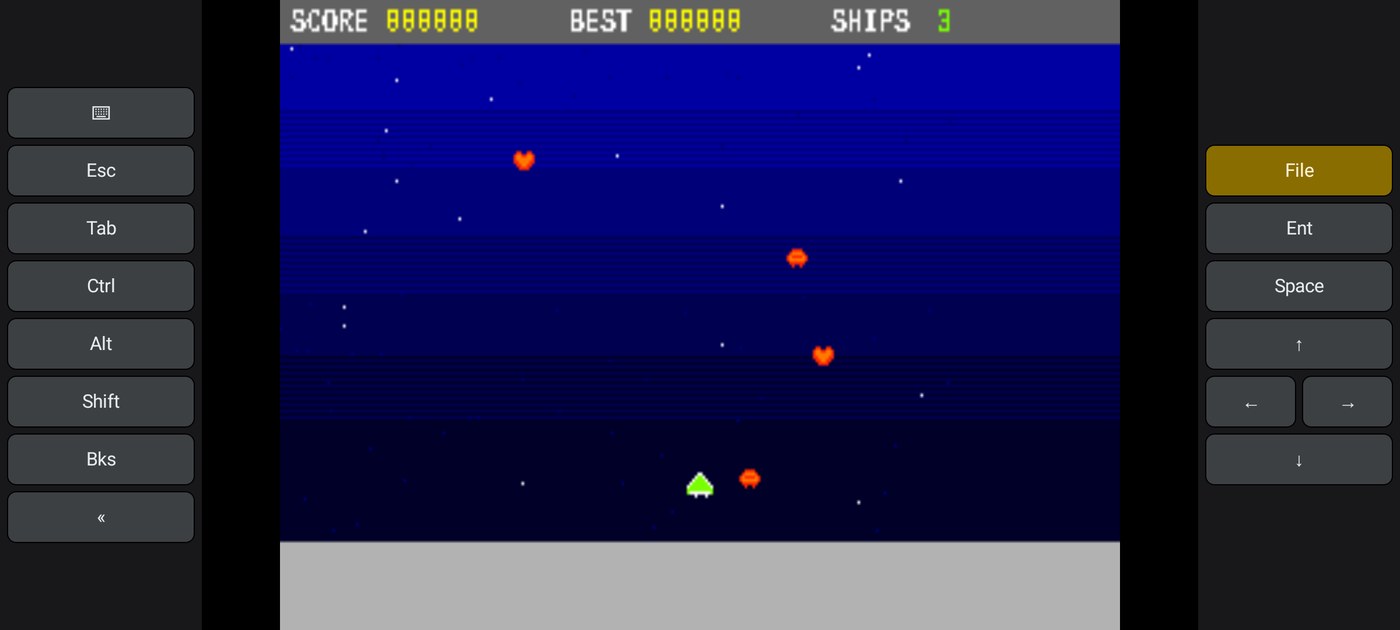
STARFALL, the example bundle, running in the new layout: the game in the middle, the keys in the bars on either side of it.
The bigger one: a JIT, and the games that needed it
Real-mode DOS programs run perfectly on an interpreter — DOSBox was written that way, and the interpreter is fast enough for anything 8-bit and 16-bit.
Protected-mode programs are a different story. A DOS/4GW extender, a protected-mode game: that is a different CPU model, and the interpreter walks it instruction by instruction. Ultima VIII — a DOS/4GW game — is exactly the kind of program the recompiler exists for.
DOSBox has a JIT — a recompiling core that emits machine code at run time. Upstream builds it with a GCC plugin, which the NDK's clang cannot do, and Android forbids making writable memory executable, which is what the stock code cache does.
Both problems turned out to be solvable. The portable code generators (arm64, armv7, x86_64) emit machine code into a buffer with no plugin involved, and the buffer is made executable with an anonymous PROT_EXEC mapping instead of a writable heap block. The JIT is now compiled into libdosbox.so for all three Android ABIs.
And the shipped configuration is core=auto:
- a program that stays in real mode runs on the interpreter, exactly as before — the JIT never engages and the code cache is never even allocated;
- a program that switches into protected mode hands over to the recompiler at the first mode switch.
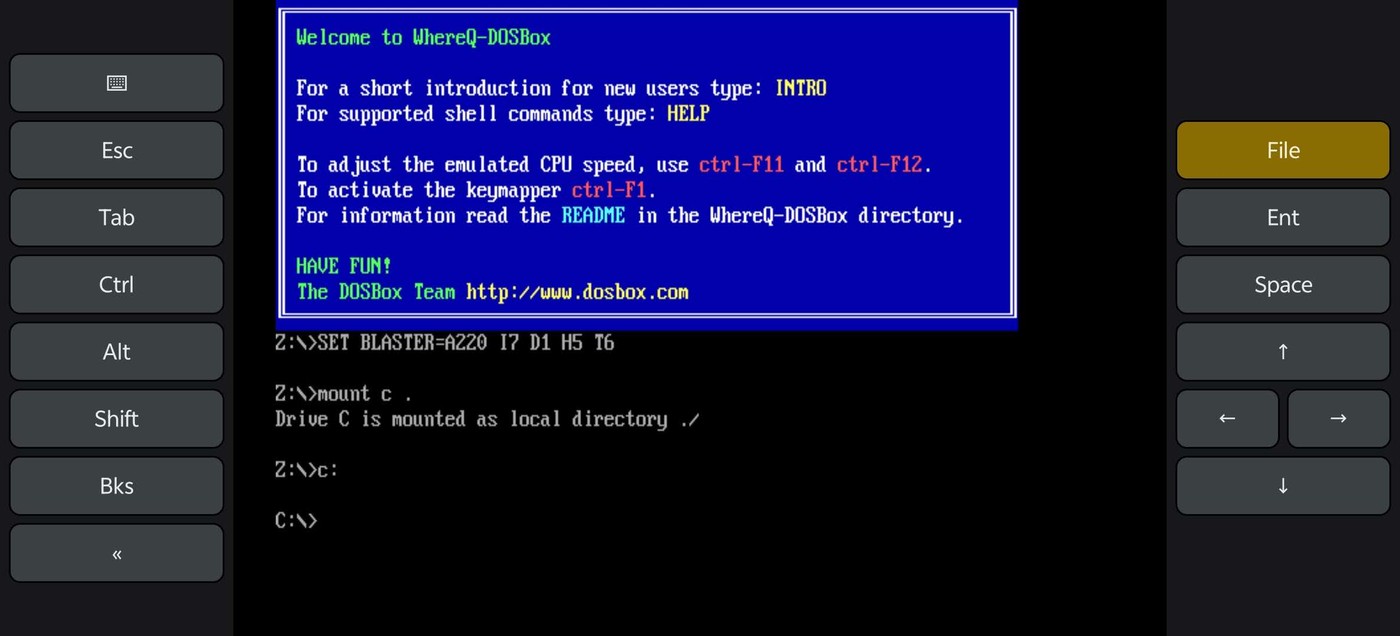
The welcome screen and a mounted C: drive, with the keyboard in the bars on either side. The emulator core is the real DOSBox, not a re-implementation of it.
Honest about the APK size
The first announcement said the APK was about 5.3 MB. It is now about 15.5 MB, and I would rather explain that than let you find out from the download.
Two reasons, both on purpose. The native libraries are stored uncompressed in the APK, so Android can map them straight out of it instead of copying them to disk on every install — that is most of the difference. And the app layer is now Kotlin with AndroidX, which adds roughly 4.5 MB of dex.
The trade is: a bigger download, in exchange for an install that is faster and a machine that behaves like a machine.
The setting I documented but did not ship
In v1.0.0.6 I wrote, in the documentation and in this very repository: "If the JIT code cache cannot be allocated, put core=normal in dosbox.conf as the fallback."
Then I tried to follow my own advice. dosbox.conf is regenerated from the shipped template on every boot — deliberately, so that a change to the template reaches phones that are already installed. Which means a hand-edited dosbox.conf is overwritten at the next start. And the file lives in the app's private directory anyway, where no file manager can reach it.
The fallback I documented was not reachable. A handful of old DOS programs do misbehave on the recompiler, and I had given them no way out.
So the Files panel has a Config button now:
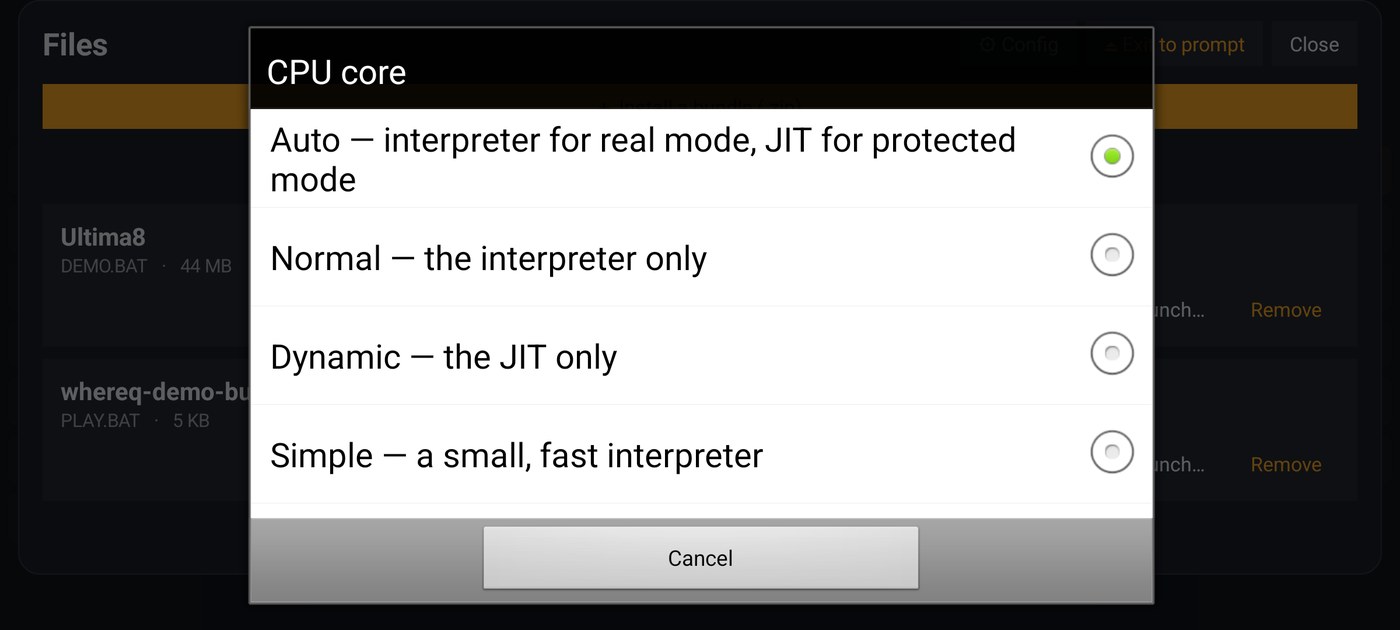
The CPU core, pickable in the app: Auto (the default), Normal, Dynamic, Simple, Prefetch. DOSBox chooses its core when it starts, so the app asks whether to restart.
The choice is stored and written into the generated configuration, so it survives a restart and an app update. One small dialog — and a promise in the documentation that is now true.
What else changed
The app layer was ported from Java to Kotlin — the same eight classes, rewritten — and Gradle is now the canonical build. The release script was taught to update the Android manifest, and it no longer stages the whole working tree into a release commit. The emulator script starts the emulator on the real GPU instead of a software rasterizer that drew the screen in scattered tiles.
And STARFALL — the example bundle — is in the tree: a tiny arcade game in 16-bit DOS assembly, one .COM of about 5 KB, no runtime, no libraries, committed as a ready-to-install .zip. It exists so that a new user can see the whole flow — install a bundle, press Play, watch a game run — without having to find a game first.
Get it
The release APK is in the repository, and it is signed with the release key, so a later version installs over it in place:
👉 github.com/whereq/whereq-dosbox — tag v1.0.0.7
downloads/whereq-dosbox-1.0.0.7.apk
sha256: 2e97f12f3901acbdc23f62395316df25aa51f4a081d941a950b2d7dfa36910a1
It runs on arm64-v8a, armeabi-v7a and x86_64 devices, Android 5.0 and newer, entirely offline, with no account and no tracking.
The project is GPL-2.0 and the DOSBox core is embedded with its AUTHORS, ChangeLog, COPYING and per-file headers intact. The port touches the core in only a handful of small, local places — the SDL video and touch paths, the mouse mapping, the Android branch of the JIT's code cache, a couple of fixes that only silence the compiler. Everything else is upstream code.
Again, this post is not the documentation. The documentation is the repository: the build guide, the porting log, the benchmark notes, and every line of the port. Please read those rather than take my word for it.
Thank you, DOSBox
None of this is possible without the DOSBox project.
DOSBox was written by the DOSBox Team — a volunteer crew who took an operating system from 1994 and made it runnable on every machine the world has produced since, including the ones that did not exist yet. They kept it alive for three decades and gave it away to anyone who wanted it. WhereQ-DOSBox is a thin layer on top of their work. The originality, the craft and the generosity are entirely theirs.
This port is built on Em-DOSBox, the Emscripten build of DOSBox r4305 by Boris Gjenero, which grew out of Ismail Khatib's first attempt to compile DOSBox with Emscripten, and rode on the Emscripten work of Alon Zakai. The SDL2 library by Sam Lantinga carries the window, the audio and the touch input.
DOSBox is a trademark of the DOSBox project; this port is not affiliated with or endorsed by the DOSBox team.
If a game of yours now runs on your phone — or if it doesn't, and the CPU core dialog is where you give up on it — tell me. I am keeping a list, and it is the most useful thing anyone can send me.