
2 posts tagged with "ssl"

View All Tags

Differences Between pem csr key crt and Other File Extensions

· 7 min read

Differences Between .pem, .csr, .key, .crt, and Other File Extensions


1. Introduction​

When dealing with SSL/TLS certificates, you often encounter various file extensions like .pem, .csr, .key, and .crt. Each serves a different purpose in the certificate creation, signing, and installation process. Understanding these files and how they interrelate is essential for setting up secure communications.

Key Points:​

  • SSL/TLS Certificates: Secure communication over the internet.
  • File Extensions: Different formats for storing cryptographic data.
  • Certificate Lifecycle: From generation to deployment.

2. What is a .pem File?​

A PEM (Privacy Enhanced Mail) file is a container format used for encoding certificates, keys, and other related data in Base64. It is often used to store the root, intermediate, and server certificates in SSL communication.

Characteristics:

  • Encoded in Base64 (ASCII-readable).
  • Enclosed between -----BEGIN CERTIFICATE----- and -----END CERTIFICATE-----.

PEM can store:

  • Certificate authority (CA) certificates.
  • Server certificates.
  • Private keys.

Example Content of a .pem file:

-----BEGIN CERTIFICATE-----
MIIDdzCCAl+gAwIBAgIE...
-----END CERTIFICATE-----

Key Points:​

  • Base64 Encoding: ASCII-readable format.
  • Multiple Uses: Can store certificates and private keys.
  • Commonly Used: Widely supported across different platforms.

3. What is a .csr File?​

A CSR (Certificate Signing Request) is a file generated when applying for an SSL certificate. It contains information about the domain and organization and is submitted to the Certificate Authority (CA) to request a signed certificate.

Key Points:

  • It includes public key information and information about the organization.
  • The CA uses it to generate a signed certificate.

Example Content of a .csr file:

-----BEGIN CERTIFICATE REQUEST-----
MIICzDCCAbQCAQAw...
-----END CERTIFICATE REQUEST-----

Key Points:​

  • Public Key: Included in the CSR.
  • Organization Info: Details about the domain and organization.
  • CA Submission: Sent to the CA for certificate issuance.

4. What is a .key File?​

A KEY file contains the private key used to encrypt and decrypt information. Private keys must remain confidential and should never be shared. They are used to secure communication between clients and servers, and they are essential for creating CSRs and decrypting SSL traffic.

Key Points:

  • It is used to sign the CSR and decrypt the certificate.
  • Stored in PEM format but holds private key data.

Example Content of a .key file:

-----BEGIN PRIVATE KEY-----
MIIEvAIBADANBgkq...
-----END PRIVATE KEY-----

Key Points:​

  • Confidentiality: Must be kept secret.
  • Encryption/Decryption: Used to secure communication.
  • CSR Generation: Required for creating a CSR.

5. What is a .crt File?​

A CRT (Certificate) file contains the SSL certificate issued by a CA. This certificate is used to secure communication between a client and a server. It contains the public key of the entity and is signed by the Certificate Authority.

Key Points:

  • Often used interchangeably with .pem.
  • It may be in PEM or DER format.
  • Typically contains the public key of the certificate holder.

Example Content of a .crt file:

-----BEGIN CERTIFICATE-----
MIIC+DCCAeCgAwIBAgIJALfZc1...
-----END CERTIFICATE-----

Key Points:​

  • Public Key: Included in the certificate.
  • CA Signature: Ensures the certificate's authenticity.
  • Interchangeable: Often used with .pem format.

6. Other Common Certificate Formats​

DER (.der):

  • Binary version of PEM.
  • Commonly used in Windows.
  • Can store certificates and private keys.

PFX/PKCS12 (.pfx or .p12):

  • Binary format for storing the certificate, intermediate certificates, and private key in one file.
  • Often used in Windows IIS servers.

Key Points:​

  • DER: Binary format for certificates.
  • PFX/PKCS12: Bundles certificates and private keys.
  • Platform-Specific: Used in different operating systems.

7. File Extensions and Corresponding Commands​

Here are some common OpenSSL commands for generating, converting, and inspecting certificate files:

Generate a Private Key (.key):​

openssl genrsa -out private.key 2048

Generate a CSR (.csr):​

openssl req -new -key private.key -out request.csr

View CSR Content:​

openssl req -in request.csr -noout -text

Generate a Self-Signed Certificate (.crt):​

openssl req -x509 -new -nodes -key private.key -sha256 -days 365 -out certificate.crt

Convert a PEM to DER:​

openssl x509 -outform der -in certificate.pem -out certificate.der

Convert a PEM to PFX:​

openssl pkcs12 -export -out certificate.pfx -inkey private.key -in certificate.crt -certfile ca.crt

View Certificate Content (.crt, .pem):​

openssl x509 -in certificate.crt -noout -text

Key Points:​

  • OpenSSL: Command-line tool for managing certificates.
  • Generation: Creating private keys and CSRs.
  • Conversion: Converting between different formats.
  • Inspection: Viewing certificate details.

8. Diagram: Certificate Workflow​

Here's a diagram to illustrate the typical workflow from generating a private key to receiving a certificate from a Certificate Authority:

+-----------------------+ +--------------------+ +---------------------+
| Private Key (.key) | -----> | CSR (.csr) | -----> | Certificate (.crt)|
+-----------------------+ +--------------------+ +---------------------+
| ^
| |
| Certificate Signing |
+--------------------------------------+
  1. Generate Private Key: The .key file is generated first, which is necessary for creating a CSR.
  2. Generate CSR: A .csr is generated using the private key and sent to the CA.
  3. Receive Certificate: The CA signs the CSR and returns a .crt or .pem certificate file.

Key Points:​

  • Workflow: From key generation to certificate issuance.
  • CA Role: Signing the CSR to produce a certificate.
  • End Result: A signed certificate for secure communication.

9. Conclusion​

Understanding the differences between certificate-related files like .pem, .csr, .key, and .crt is essential for managing SSL certificates. Each of these files has a unique role in the certificate lifecycle, from generating requests to securing communications. These files work together to ensure the integrity and security of encrypted data transmissions over the web.

Key Takeaways:​

  • File Types: Understand the purpose of each file extension.
  • Lifecycle: Follow the certificate lifecycle from generation to deployment.
  • Security: Ensure proper handling and protection of private keys.

By mastering these concepts, you can effectively manage SSL certificates and ensure secure communication in your applications.
Understanding Root and Intermediate Certificates

· 7 min read

Understanding Root and Intermediate Certificates​


1. What are Certificates?​

Certificates are digital documents that verify the identity of an entity (such as a website) and establish secure communication between servers and clients. A certificate ensures the authenticity of the entity claiming to be what it is.

Key Points:​

  • Digital Signature: Certificates are digitally signed by a Certificate Authority (CA) to ensure their authenticity.
  • Public Key Infrastructure (PKI): Certificates are a fundamental part of the PKI, which is used to secure online communications.
  • Types of Certificates: There are various types of certificates, including SSL/TLS certificates, code signing certificates, and email certificates.

2. Introduction to Certificate Authority (CA)​

A Certificate Authority (CA) is a trusted entity responsible for issuing digital certificates. These certificates bind a public key with an entity's identity, like a domain name or a company. The CA plays a crucial role in the Public Key Infrastructure (PKI) system, which helps to secure online communications.

Key Points:​

  • Issuing Certificates: CAs issue certificates after verifying the identity of the entity requesting the certificate.
  • Trust Model: Browsers and operating systems come pre-installed with a list of trusted Root CAs.
  • Revocation: CAs can revoke certificates if they are compromised or no longer valid.

3. Root Certificates​

A Root Certificate is the foundation of a trust chain. It is issued by a Root Certificate Authority (Root CA), which is a trusted entity pre-installed in web browsers and operating systems. All certificates trust a Root CA, and this trust is propagated through the chain of certificates.

Key Points:​

  • Self-Signed: Root Certificates are self-signed.
  • Ultimate Trust Anchor: They act as the ultimate trust anchor.
  • Reputation: Root CAs are only issued to very reputable organizations, and compromising a root certificate would cause massive security breaches.

4. Intermediate Certificates​

An Intermediate Certificate is issued by a Root CA or another Intermediate CA. Intermediate certificates act as middle layers in the trust chain, allowing the Root CA to delegate the task of issuing end-user certificates.

Key Points:​

  • Delegation: Intermediate Certificates are used to spread the trust of a Root Certificate.
  • Security: They ensure that if an Intermediate CA is compromised, the damage is limited to certificates issued by that Intermediate CA, not the root.
  • Hierarchy: Intermediate Certificates are usually signed by the Root CA or another trusted intermediate CA.

5. Chain of Trust​

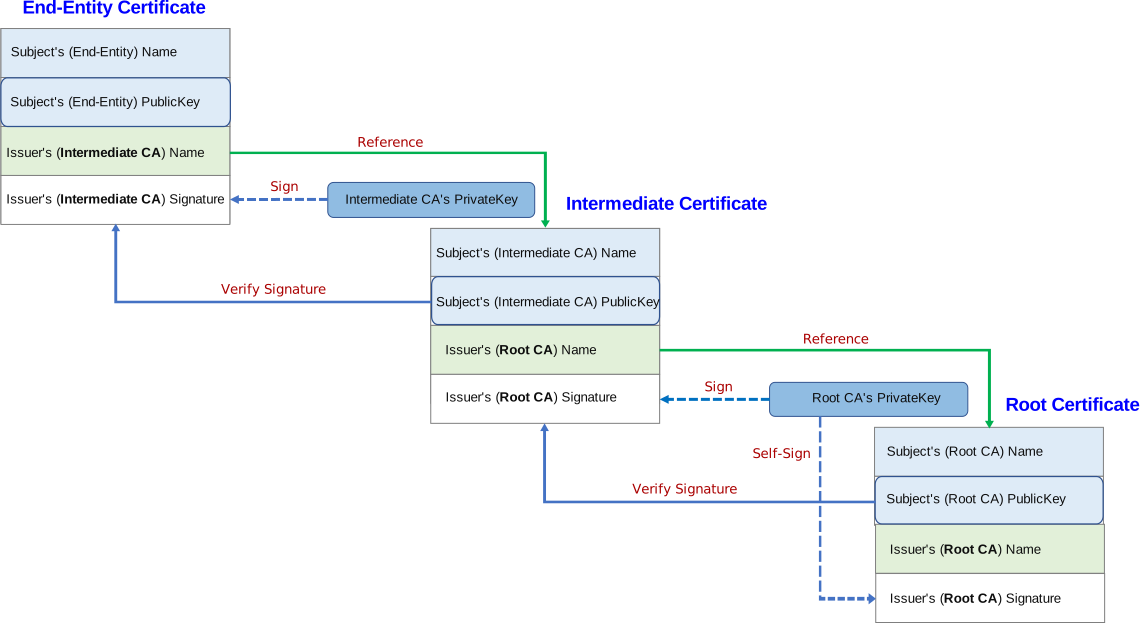
The Chain of Trust is the hierarchy of certificates starting from the Root Certificate at the bottom(root), followed by Intermediate Certificates, and finally the End-Entity Certificate (also known as the Leaf Certificate), which is the certificate for the actual entity (e.g., a website).

Chain of Trust
Fanyangxi – CC BY-SA 4.0

Key Points:​

  • Hierarchy: The chain of trust ensures that each certificate in the chain is signed by the next certificate up the chain.
  • Validation: When a client connects to a server, it validates the entire certificate chain up to the trusted Root CA.
  • Security: The chain of trust ensures that only trusted certificates are used for secure communications.

6. Why are Intermediate Certificates Used?​

Intermediate certificates are used for several reasons:

  1. Security: If a root certificate is compromised, all certificates under it are compromised. Intermediate certificates limit the scope of a breach.
  2. Delegation: Root certificates delegate the issuance of certificates to intermediates, spreading out the load and responsibility.
  3. Certificate Revocation: If an Intermediate CA is compromised, only certificates issued by that intermediate can be revoked without affecting the root.

Key Points:​

  • Scalability: Intermediate CAs allow the Root CA to scale its operations by delegating certificate issuance.
  • Flexibility: Intermediate CAs can be managed independently, allowing for more granular control over certificate issuance and revocation.
  • Risk Mitigation: Intermediate CAs reduce the risk of a single point of failure by distributing trust across multiple entities.

7. Sample Certificate Chain​

Let's assume we are visiting a secure website. The browser will validate the certificate using a chain similar to the following:

  1. Root Certificate: Trusted by browsers.
  2. Intermediate Certificate: Signed by the Root CA.
  3. Leaf Certificate: Issued for the website and signed by the Intermediate CA.

Key Points:​

  • Validation Process: The browser validates the entire chain, starting from the Leaf Certificate and moving up to the Root Certificate.
  • Trust Check: If any certificate in the chain is not trusted, the connection will fail.
  • Chain Length: The length of the chain can vary depending on the number of intermediate CAs involved.

8. Diagram: Certificate Chain​

Here's a visual diagram to explain the trust chain:

+--------------------------+
| Root CA |
| (Trusted by OS) |
+--------------------------+
|
v
+--------------------------+
| Intermediate CA 1 |
| (Issued by Root CA) |
+--------------------------+
|
v
+--------------------------+
| Intermediate CA 2 |
| (Issued by Int. CA 1) |
+--------------------------+
|
v
+--------------------------+
| End-Entity Cert |
| (Issued for example.com) |
+--------------------------+

Key Points:​

  • Hierarchy: The diagram shows the hierarchical structure of the certificate chain.
  • Trust Propagation: Trust is propagated from the Root CA down to the End-Entity Certificate.
  • Validation Path: The browser follows this path to validate the certificate chain.

9. Python Code Example for Validating Certificates​

We can use the ssl and cryptography libraries in Python to validate and inspect the certificate chain. Below is an example that uses Python to verify the SSL certificate chain of a given website.

Python Code to Validate a Certificate Chain​

import ssl
import socket
import OpenSSL

def get_certificate_chain(hostname, port=443):
"""Fetch and print the certificate chain for a given hostname."""
context = ssl.create_default_context()
conn = context.wrap_socket(
socket.socket(socket.AF_INET),
server_hostname=hostname,
)
conn.connect((hostname, port))

# Get the certificate chain
cert_bin = conn.getpeercert(True)
cert = ssl.DER_cert_to_PEM_cert(cert_bin)
x509 = OpenSSL.crypto.load_certificate(OpenSSL.crypto.FILETYPE_PEM, cert)

# Print certificates in the chain
chain = conn.getpeercert(True)
print(f"Certificate chain for {hostname}:\n")

for (idx, cert) in enumerate(chain):
print(f"Certificate {idx + 1}:\n")
print(OpenSSL.crypto.dump_certificate(OpenSSL.crypto.FILETYPE_PEM, cert).decode())

conn.close()

# Example: get certificate chain for a website
get_certificate_chain('www.example.com')

Key Points:​

  • SSL Context: The ssl.create_default_context() function creates a default SSL context with secure settings.
  • Socket Connection: The wrap_socket method wraps a standard socket in an SSL socket, allowing secure communication.
  • Certificate Chain: The getpeercert method retrieves the certificate chain from the server.
  • Print Certificates: The certificates in the chain are printed in PEM format for inspection.

10. Conclusion​

Root and Intermediate certificates are crucial to securing communications and establishing trust on the internet. By using a layered approach with Intermediate CAs, Root CAs can safely distribute trust across various entities while minimizing risk in case of a security breach.

Key Takeaways:​

  • Trust Model: The chain of trust ensures that only trusted certificates are used for secure communications.
  • Security: Intermediate certificates limit the scope of a breach, ensuring that if an Intermediate CA is compromised, only certificates issued by that intermediate are affected.
  • Scalability: Intermediate CAs allow the Root CA to scale its operations by delegating certificate issuance.

By mastering these concepts, you can better understand how certificates work and how they are used to secure online communications.